

LINSEIS LiEAP Software
Configure measurement workflows, acquire data, and analyze results in a shared software environment.
From defining the temperature program and live monitoring of measurement signals to subsequent evaluation: in the lab, numerous steps must be coordinated. LINSEIS LiEAP (Linseis Evaluation and Acquisition Platform) brings these tasks together in a single software environment.
The platform enables you to prepare and save measurement methods, control instruments, monitor ongoing measurements, and then evaluate and document the recorded data.
LiEAP is currently available for the LINSEIS instrument groups DSC, TGA, STA and LFA. The user interface and available functions are adapted to the respective measurement system, while following a consistent operating concept.
Four programs, one platform

Measurement
Prepare and save measurement methods, control instruments, and monitor ongoing measurements.

Evaluation
Measurement data management, curve visualization, and method-specific analysis functions in a single user interface.

User management
Individual user accounts and user groups with role-based access rights.

Update
Keeps the LiEAP programs up to date and can be managed within the platform.
One software platform for different measurement methods
The LiEAP platform combines different measurement methods within a shared operating concept. The available functions depend on the respective instrument group and the requirements of the measurement method.
Thermal analysis: DSC, TGA and STA
For measurement systems for differential scanning calorimetry (DSC), thermogravimetric analysis (TGA), and simultaneous thermal analysis (STA), LiEAP provides the functions for preparing and performing thermal measurements.
Depending on the connected system, sample parameters, temperature programs, measurement types, and gas atmospheres can be configured, for example.
The measurement signals are recorded during the experiment and can then be analyzed with the LiEAP Evaluation software.
In an STA measurement, for example, calorimetric and thermogravimetric signals can be viewed together. This makes it possible to investigate thermal events and simultaneously occurring mass changes within a single measurement.
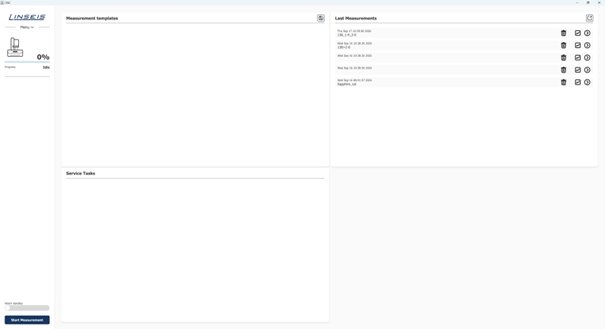
Figure 1: The LiEAP start screen provides direct access to measurement templates, most recently performed measurements, and current service information.
Compatible instruments
Thermal conductivity: Laser flash analysis (LFA)
Laser flash analysis (LFA) is also integrated into the LiEAP software platform.
In this method, a material’s thermal diffusivity is determined from its time-dependent temperature response to a short energy pulse.
LiEAP supports the preparation and execution of corresponding measurements as well as the subsequent evaluation of the recorded data.
The user interface and available settings are tailored to the requirements of the LFA measurement system, so that method-specific steps can be carried out within the consistent software concept.
Additional measurement methods can be integrated into the platform in the future. The software structure is designed to bring different measurement systems together within a shared operating concept.
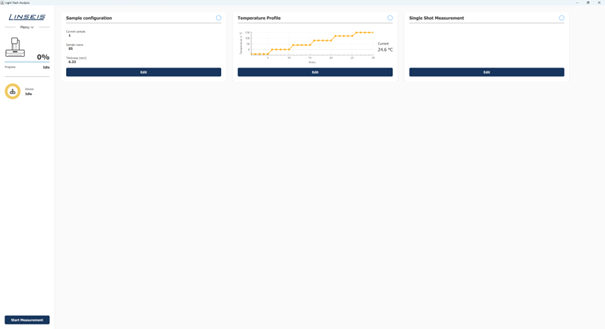
Figure 2: The LiEAP start screen for LFA provides direct access to measurement templates, most recently performed measurements, and current service information.
Compatible instruments
From measurement preparation to data acquisition
Quickly to the next measurement
The start screen provides the most important functions for day-to-day lab work. Recently performed measurements can be opened immediately. Alternatively, the settings of an existing measurement can be adopted and used as the basis for a new experiment.
Saved measurement templates are available for recurring applications. This means a measurement program defined once does not need to be reconfigured for every measurement. This reduces preparation effort and supports running measurement series under comparable conditions.
Prepare measurements clearly
The dashboard is the central workspace of the measurement software. This is where the settings relevant to the experiment are brought together. Depending on the connected instrument, these include, for example, sample parameters, measurement type, temperature program, and gas atmosphere.
During an ongoing measurement, the dashboard also serves to display the current measurement signals and measurement progress.
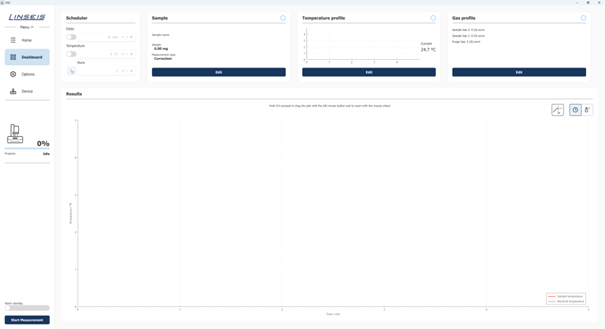
Figure 3: Dashboard of the LiEAP Measurement software for preparing and monitoring a measurement.
Define the sample and measurement type
At the start, the relevant information about the sample is entered. This includes, for example, sample name, sample weight, measurement type, crucible, and additional comments.
The available measurement types depend on the connected measurement system. In simultaneous thermal analysis (STA), for example, Correction, Heat Flow, Cp, Cp Reference, or pure TGA measurements are available.
Suitable correction, reference, and calibration curves can be assigned during preparation. They are then available for the measurement or evaluation without needing to be selected again.
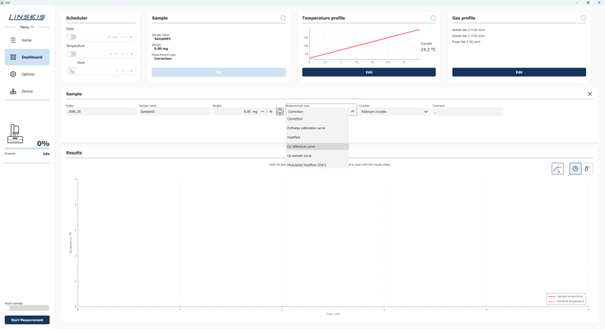
Figure 4: Example of an STA configuration. Depending on the connected measurement system, different measurement types and the associated reference and correction curves can be selected.
Create temperature programs flexibly
The temperature program is built from individual segments. For each segment, target temperature, heating or cooling rate, and hold time can be defined.
The resulting temperature profile is displayed graphically in parallel. This allows you to check before starting whether the programmed profile matches the planned experimental sequence.
For more complex measurement programs, individual segment sequences can be repeated automatically without having to enter the corresponding steps multiple times.
This function is particularly helpful for cyclic temperature loads or test series with repeated temperature changes.
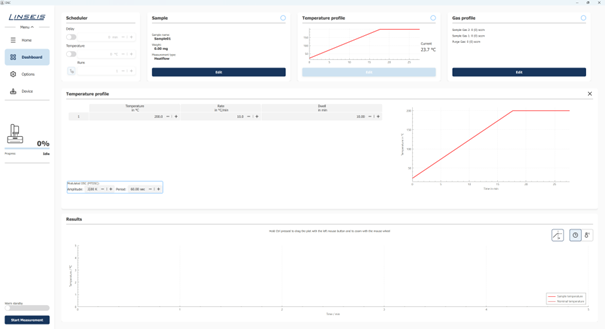
Figure 5: Segment-based structure of a temperature program with a graphical preview of the defined temperature profile.
Control the gas atmosphere to match the measurement
With appropriately equipped measurement systems, a gas profile can also be defined.
The gas flows are assigned to the individual segments of the temperature program. In addition to constant gas flows, ramps and cyclic sequences can also be defined.
This allows, for example, different atmospheres to be set during defined temperature sections or gas changes to be linked to specific phases of the experiment.
This coordinates temperature control and gas atmosphere within a single measurement program.
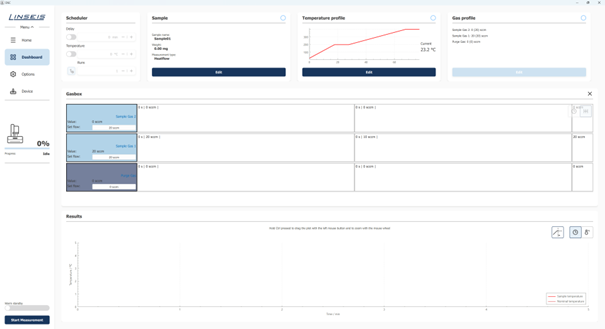
Figure 6: Programming a gas profile with segment-dependent gas flows and time-defined changes in atmosphere.
Run measurement series automatically
For recurring measurements, LiEAP includes an integrated scheduler. This allows a defined measurement method to be executed automatically multiple times.
In addition to the number of runs, you define under which conditions the next measurement starts. This can be, for example, after a certain waiting time or after reaching a defined sample temperature.
This control is particularly helpful for repeat measurements, as the start conditions for successive experiments can be defined precisely.
In addition, a preheating temperature can be defined to reach a specified thermal initial state before the actual measurement begins.
In this way, the scheduler supports longer measurement series and reduces manual effort between individual experiments.
Keep an eye on the measurement live
During an ongoing measurement, the recorded signals are displayed directly in the dashboard and continuously updated.
Depending on the measurement system, sample temperature, setpoint temperature, and DSC, DTA, or TGA signals, for example, can be tracked in parallel. The display can be time- or temperature-dependent.
Instrument status and measurement progress remain visible at the same time. This allows you to check during the experiment whether the temperature program is running as intended and how the measurement signals are developing.
Unexpected signal trends or deviations from the planned measurement program can thus be detected early and taken into account in the later evaluation.
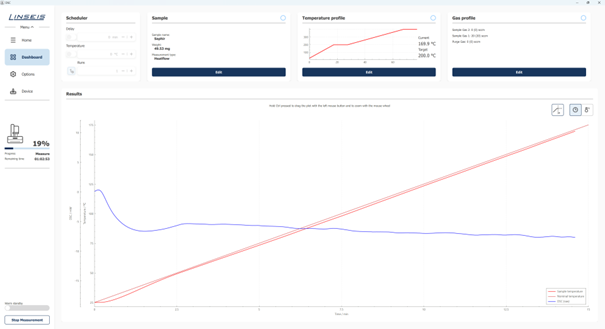
Figure 7: Live display of the measurement curves, the temperature program, and the current measurement progress within the LiEAP software.
Questions? Just give us a call!
+49 (0) 9287/880 0
Thursday from 8 am to 4 pm
and Friday from 8 am to 12 pm.
We are here for you!
Evaluate measurement results with LiEAP Evaluation
After a measurement is completed, the recorded data can be opened in the LiEAP Evaluation software and analyzed further.
The evaluation software combines measurement data management, curve visualization, and method-specific analysis functions in a single user interface.
Multiple measurements and measurement channels can be combined within a project. This allows, for example, different samples, measurement conditions, or different signals from an STA measurement to be viewed together and compared.
Evaluations that have already been performed remain saved in the respective project and are also available for later analyses.
The user interface is divided into several functional areas that handle different tasks within the evaluation.
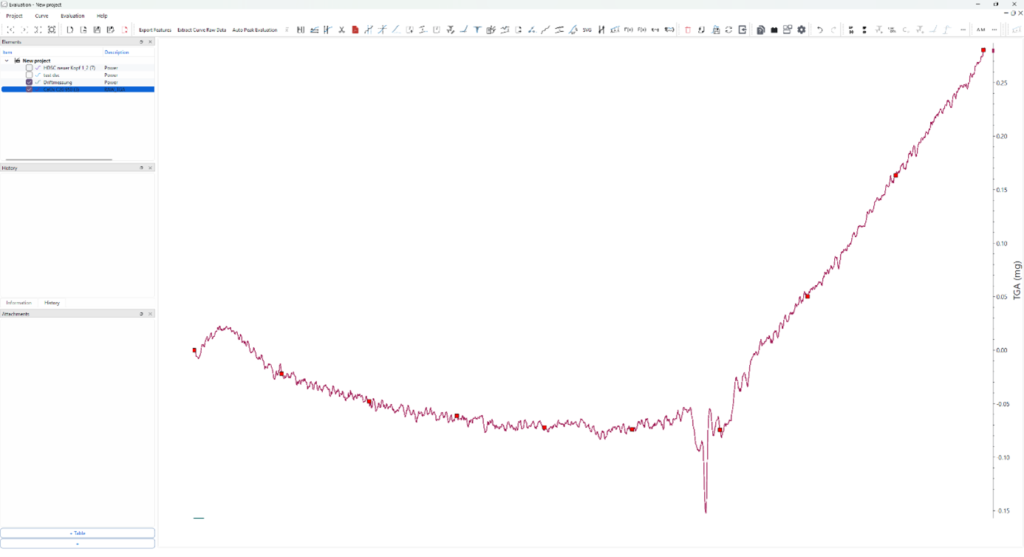
Figure 8: The LiEAP Evaluation software with project management, evaluation tools, central chart area, edit history, and file attachments.
1. Manage projects and measurements
In the Elements area, the opened projects as well as the measurements and measurement channels they contain are displayed.
Multiple curves can be assigned to a project and evaluated together. This allows, for example, measurements of different samples to be compared directly or different signals from the same experiment to be compared with each other.
In an STA measurement, for example, the DSC signal and the simultaneously recorded mass change can be viewed within a single project.
Evaluations that have already been carried out also remain assigned to the respective project. This allows existing results to be reopened and further edited at a later time.
2. Evaluation tools at your fingertips

General and method-specific evaluation functions are available via the menu and toolbar.
Depending on the measurement signal, these include, for example:
- Peak and enthalpy evaluation
- Onset determination
- Glass transition evaluation
- Determination of specific heat capacity
- Mass change and residual mass
- Differentiation and integration
- Filtering and smoothing of measurement curves
- Calibration functions
The tools can be applied directly to the selected measurement curve.
In a DSC measurement, for example, thermal transitions can be examined based on the curve profiles and characteristic temperatures can be determined. In thermogravimetric measurements, on the other hand, mass changes and their temperature-dependent progression are the focus.
The available evaluation functions are therefore aligned with the respective requirements of the measurement method.
3. Display and compare measurement curves
The central chart area is used for the graphical display of the loaded measurement curves.
Multiple measurements and measurement channels can be displayed simultaneously. Signals with different physical units can also be displayed together. LiEAP automatically adds the required chart axes for this purpose.
This is particularly helpful for combined measurement methods such as simultaneous thermal analysis. For example, calorimetric signals and mass changes can be viewed in the same chart.
Different samples or measurement conditions can also be compared to investigate similarities and differences in thermal behavior.
4. Track evaluation steps
The Information and History areas provide additional information about the selected measurement curve as well as previously performed editing steps.
If a curve is cropped or edited, for example, the corresponding action appears in the edit history.
This makes it possible to trace which changes were made during the evaluation.
Especially for more complex analyses with multiple processing steps, the history makes it easier to control the evaluation process and supports transparent documentation of the results.
5. Combine additional data in the project
In the Attachments area, additional information can be assigned to an evaluation project.
In addition to tables, external CSV, DAT, TXT, or image files can be included, for example.
This allows additional information relevant to interpreting a measurement to be managed together with the actual measurement data.
This makes it easier to organize more extensive evaluation projects in which, in addition to the recorded measurement curves, further data or documentation must be taken into account.
Reuse measurement data flexibly
Further processing of the measurement data is not limited to LiEAP.
Measurement curves can be exported as CSV files, for example, and then processed in your own evaluation routines or external analysis programs.
This allows LiEAP measurement data to be integrated into existing scientific workflows, for example when additional calculations or custom-developed evaluation methods are required for specific research questions.
In addition, measurement curves and complete projects can be saved in the LINSEIS File Format (.lff) and imported again later.
Associated reference materials, correction curves, or reference curves can also be transferred. This makes it easier to share and reuse evaluation projects that have already been prepared.
Compare measurement data intelligently with references
The optional LINSEIS Thermal Library extends LiEAP with a database-based search and comparison of measurement data.
Your own measurement results can be compared with existing reference data and previously saved measurements. At the same time, the database can be continuously expanded with your own materials and reference measurements.
This allows an individual reference and knowledge base to develop over time, documenting materials that have already been investigated and their thermal behavior.
This is particularly interesting for laboratories in which similar materials are regularly characterized or measurement results are compared with known references.
Questions? Just give us a call!
+49 (0) 9287/880 0
Thursday from 8 am to 4 pm
and Friday from 8 am to 12 pm.
We are here for you!
Additional features for everyday lab work
In addition to measurement preparation, instrument control, and data analysis, LiEAP provides additional functions that support documentation and organization of lab work.
Create custom measurement reports
With the integrated Report Generator, measurement results can be output as a PDF report.
Using individually configurable templates, you define which content is included in the report. This includes, for example, measurement parameters, temperature programs, result tables, and charts.
The templates can be adapted to different requirements, for example when a standardized report structure is needed for specific measurement methods, labs, or customers.
This makes it possible to document measurement results in a recurring structure and provide them for further use.
Administration and data management
Manage users and access rights
LiEAP supports individual user accounts and user groups.
Depending on the role, different access rights can be assigned. For example, you can define which users are allowed to perform measurements, change instrument settings, or use administrative functions.
This allows access permissions to be set up according to the lab’s organizational requirements.
Store materials centrally
In the software, materials can be stored together with known thermal and thermophysical properties.
These include, for example:
- Thermal expansion
- Specific heat capacity
- Enthalpy of fusion
- Thermal conductivity
- Thermal Conductivity
- Density
The stored material properties can then be used, among other things, for reference and calibration applications.
Central management makes the stored material information available for recurring applications without having to re-enter it for each measurement.
Measurement preparation, execution, and evaluation in a seamless workflow
LiEAP combines the preparation and control of thermal measurements with subsequent data analysis. Saved measurement methods, automated processes, and the shared display of different measurement signals make day-to-day lab work easier.
At the same time, project management, documented evaluation steps, and flexible export options support traceable further processing of the results.
Thanks to the consistent operating concept, measurement workflows for different LINSEIS measurement systems can be prepared, carried out, and evaluated on a shared software basis.
Request software file or support
For installation files, updates, or questions about LiEAP, you can reach our team via the contact form.